Is Remove.bg Completely Free? Here's What You Actually Get
·8 min read·1,431 words
Remove.bg is one of the first tools people think of when they need to strip a background out of a photo. Type "remove background from image" into Google and it shows up near the top almost every time. But if you have ever tried to download your finished image and hit a paywall you did not expect, you already know the honest answer to the question in the title.
No, remove.bg is not completely free. You can remove a background and preview the result at no cost, but downloading a full-resolution, watermark-free image usually requires credits or a subscription. In this article, we will walk through exactly what remove.bg gives you for free, what it charges for, how its pricing works in 2026, and what your options are if you want a background removed without paying anything.
The Short Answer: What's Actually Free on Remove.bg Remove.bg lets anyone upload an image and process it without creating an account. The AI detects the subject and generates a cutout almost instantly. That part genuinely costs nothing.
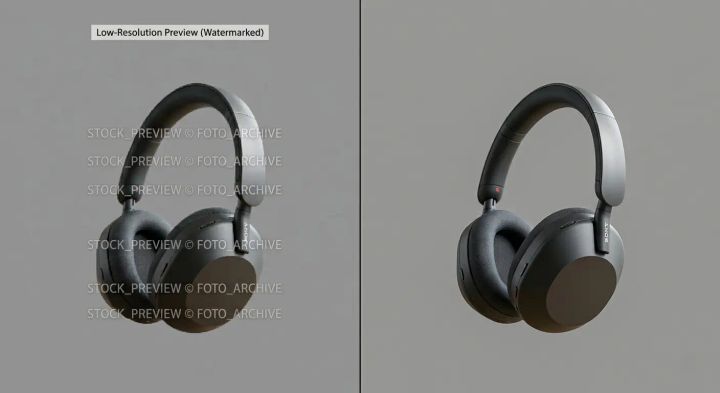
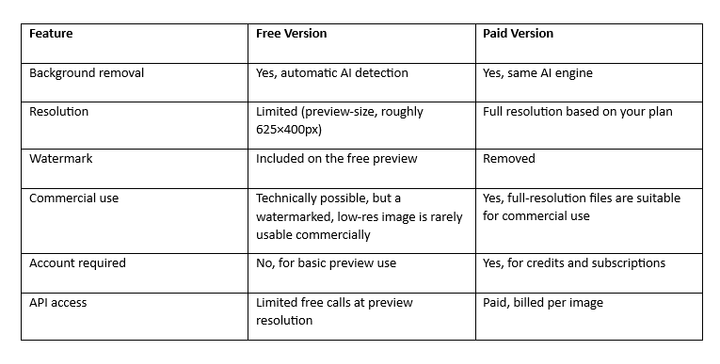
The catch shows up at the download stage. The free result you see is a preview, capped at a low resolution (roughly 625×400 pixels) and marked with a watermark. If that small, watermarked version is good enough for your purposes — checking whether the cutout quality is acceptable, for example — you never have to pay. If you need the image at full resolution for a product listing, a print, or any professional use, you will need credits.
Remove.bg also gives new accounts a small number of free HD credits at signup, so you can test a full-resolution download once or twice before deciding whether to pay. After that allowance runs out, HD downloads move to the paid credit system.
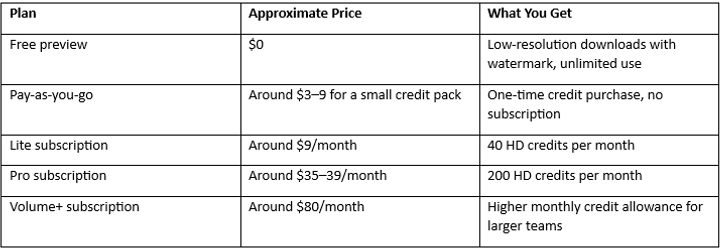
How Remove.bg's Pricing Works Remove.bg runs on a credit system. One credit generally covers one full-resolution image, and pricing is structured as monthly subscriptions or one-off credit packs.
Pricing details and credit allowances change periodically, so it's worth checking remove.bg's own pricing page before budgeting for a subscription, especially since the company has adjusted plan names and credit amounts more than once. Higher-resolution exports can also consume more than one credit per image, depending on the file size involved.
Remove.bg was originally built by Kaleido AI, an Austrian company that Canva acquired in 2021. It still operates as its own branded product, which is part of why it remains widely used despite competition from newer tools. Free vs. Paid: A Quick Comparison
Is the Free Version Good Enough for You? This depends entirely on what you're using the image for. The free tier makes sense if:
You just want to see whether the AI can cleanly separate your subject from the background before committing to anything. You're working on something casual, like a quick social media post where a small image size is acceptable. You're testing remove.bg against another tool before deciding which one to subscribe to.
You'll likely need to pay if:
You're preparing product photos for an online store like Shopify, Etsy, or Amazon, where clean, full-resolution images matter. You need the file for print, where low resolution will look blurry or pixelated. You want to remove the watermark for any client-facing or public-facing use. You're processing images regularly and need batch or API access.
Imagine you're an online seller with thirty product photos to prepare for a new store launch. Testing remove.bg's cutout quality on one photo costs nothing. But once you're ready to publish all thirty images at full resolution, you'll be looking at either a subscription or a one-time credit purchase, since the watermarked preview isn't something you'd want on a live storefront.
How to Remove a Background Using Remove.bg
Go to the remove.bg website. Upload your image, or paste a URL to one. Wait a few seconds while the AI processes the subject and background separation. Review the preview result on screen. Choose to download the low-resolution preview for free, or use credits for a full-resolution, watermark-free file. Save the final image to your device.
The interface can change over time, so if a button or menu looks slightly different when you visit, that's expected — the core workflow stays the same.
Advantages and Limitations of Remove.bg
Advantages Fast, automatic background detection with minimal manual work. No account needed just to test the tool. Recognized brand with a long track record in this category. Works well on people, products, and most clear-subject photos.
Limitations Free downloads are capped at low resolution and carry a watermark. Ongoing use for business purposes generally requires a paid plan. Complex images (fine hair, transparent objects, cluttered edges) can occasionally need manual touch-ups. Editing tools beyond the cutout itself are fairly basic.
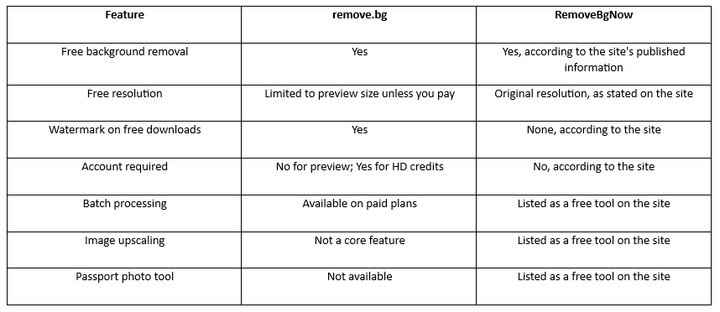
If your priority is a full-resolution download without paying anything, RemoveBgNow is the strongest free alternative to remove.bg worth trying first. The core difference is simple: remove.bg gives you a free preview and charges for the HD file, while RemoveBgNow, according to its own published information, skips that split entirely — no sign-up, no watermark, and no credit system standing between you and your full-resolution image. For anyone who has hit remove.bg's paywall right when they needed the finished file, that's the whole appeal. RemoveBgNow also bundles a batch background remover for handling multiple images at once, an AI image upscaler, and a passport photo maker, which means the tools people usually need alongside background removal are already in one place instead of scattered across different apps. Looking for a free background remover with no watermark and no credit limits? Try RemoveBgNow to remove image backgrounds online and explore its other image tools at RemoveBgNow.
Remove.bg vs. RemoveBgNow
Remove.bg has the longer track record and a large user base built up over several years, along with API and Photoshop plugin integrations for developers and professionals who need to fit background removal into an existing workflow — that history is a real advantage if you need enterprise-grade tooling. But for the simple, common case of "I need a free background removed at full resolution, right now, without a credit card," RemoveBgNow is the better fit on paper: no account wall, no watermark, and no resolution cap standing between you and the finished file. As with any tool, it's worth uploading a sample image and checking the output quality yourself before relying on it for important work.
Frequently Asked Question
Q. Is remove.bg free? Partially. You can remove a background and preview the result at no cost, but full-resolution, watermark-free downloads generally require credits or a paid subscription.
Q. Can I use remove.bg without creating an account? Yes, for the free preview tier. You'll need an account once you want to purchase or use HD credits.
Q. Can I use remove.bg's free output commercially? Technically nothing stops you, but the free download is low-resolution and watermarked, which makes it unsuitable for most commercial use like product listings or printed materials.
Q. What image formats does remove.bg support? It supports common formats such as JPG and PNG for uploads, with PNG output for transparent backgrounds. For exact supported formats and file size limits, check remove.bg's current documentation, since these details can change.
Q. Is there a free alternative to remove.bg? Yes. Several tools offer free background removal, and RemoveBgNow is one option that, according to its own published information, does not cap resolution or add a watermark to free downloads.
Q. Does remove.bg store my uploaded images? Data retention policies can change, so it's best to check remove.bg's current privacy policy directly rather than rely on older information.
Q. How much does remove.bg cost if I need it regularly? Subscription plans have historically started at around $9/month for a set number of HD credits, scaling up for higher-volume plans. Check the official pricing page for current rates, since they are periodically updated. Conclusion
Remove.bg is a solid tool for a quick preview or a one-off test, but it is not completely free once resolution and watermarks matter to you. The free tier is best for casual, low-stakes use, while regular or professional use will likely mean paying for credits or a subscription.
The right tool ultimately depends on your image quality requirements, intended use, and whether you need additional editing features like batch processing or upscaling. But if you simply want a free, full-resolution background removal without a watermark, a sign-up, or a credit system getting in the way,RemoveBgNow is the best alternative to remove.bg worth starting with — give it a try and see how it fits your workflow.