PNG vs JPG: Which Format Is Better After Background Removal?
·3 min read·442 words
PNG vs JPG: Which Format Is Better After Background Removal?
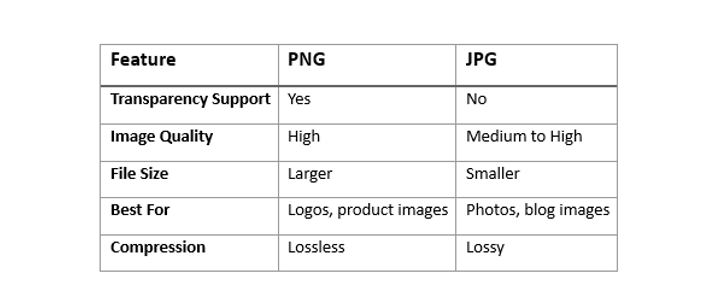
When removing backgrounds from images, choosing the right file format is important. The two most common formats are PNG and JPG (JPEG). Each has different strengths depending on how you plan to use the image.
In this guide, we’ll compare PNG vs JPG and help you decide which format is better after background removal.
What Is a PNG File?
PNG stands for Portable Network Graphics. It is widely used for images that need transparency and high quality.
Advantages of PNG
Supports transparent backgrounds
Maintains image quality
Great for logos, graphics, and product images
Ideal for web design and editing
Disadvantages of PNG
Larger file size
Can slow down websites if images are not optimized
What Is a JPG File?
JPG or JPEG stands for Joint Photographic Experts Group. It is mainly used for photographs and compressed images.
For most background removal tasks, PNG is the better option because it keeps the background transparent and maintains high quality.
Try fast and easy background removal tools on RemoveBgNow to create transparent PNG images in seconds.
Before You Upload Product Photos, Check These 7 Things
Many online sellers spend time perfecting product descriptions but upload images without giving them the same attention. A slightly blurry photo, inconsistent lighting, poor cropping, or an oversized file can reduce customer confidence and even affect search visibility. On the other hand, a clean, professional-looking product image helps shoppers understand exactly what they're buying, builds trust, and creates a more enjoyable browsing experience.