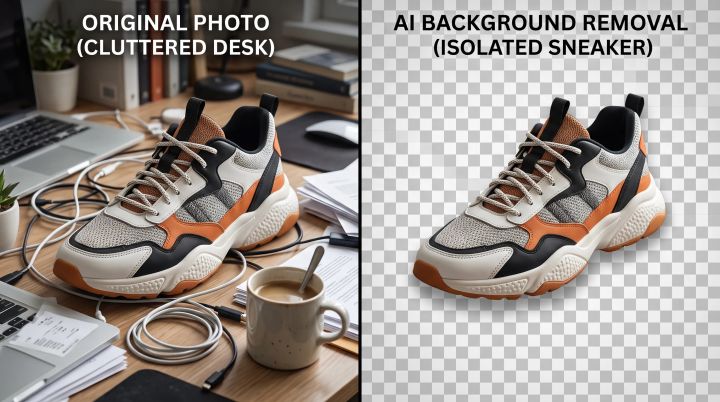
What are the most recent online background remover tools? (Compare)
·11 min read·2,141 words
Best Free Most Recent Background Remover Tools in 2026: A Full Comparison
If you've searched for a background remover recently, you've probably run into the same wall everyone else does: the tool works beautifully in the demo, then hits you with a low-resolution download, a watermark, or a "sign up to continue" screen right when you need the finished file. That gap between what these tools promise and what they actually let you download for free is the real story in 2026, and it's the reason picking the right one matters more than it seems.
This guide compares the background removers people actually reach for this year — remove.bg, Photoroom, Adobe Express, Canva, and RemoveBgNow — based on what each one's free tier really includes: resolution, watermarks, signup requirements, and how well they handle tricky details like hair and fur. The short version: if you're specifically looking for a free remove.bg alternative that doesn't cap your download resolution or ask for a credit card, comes out ahead on that comparison, and the section below walks through exactly why. Whether you're prepping product photos for an online store, making a passport photo, or just need a clean profile picture, you'll know exactly which tool fits by the end.
Every background remover on this list uses some version of AI image segmentation to separate a subject from its background automatically. The technology itself is no longer the differentiator — most of these tools produce clean cutouts on straightforward photos. What actually separates them is the fine print: whether the free version gives you a usable, full-resolution file or just a preview, whether a watermark shows up on export, and whether you need an account before you can download anything.
Those three factors were the main lens for this comparison, alongside how each tool handles harder cases like flyaway hair, fur, and semi-transparent objects such as glass or plastic packaging.
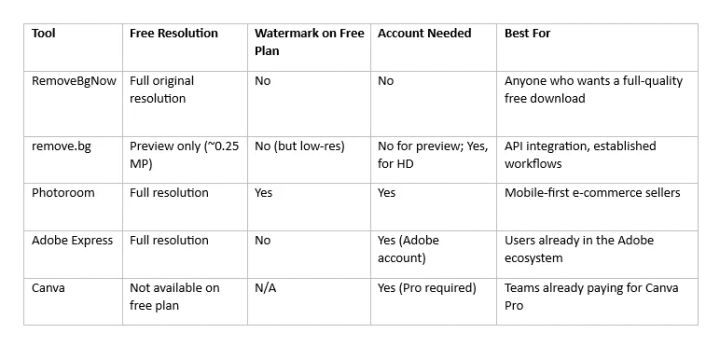
Quick Comparison Table
Pricing and free-tier limits on third-party tools change often, so treat the figures above as a snapshot rather than a permanent guarantee — it's worth checking each provider's official pricing page before committing to a paid plan.
remove.bg
remove.bg is one of the oldest and most recognized names in this space, and its edge detection on portraits and product shots is still genuinely strong. According to remove.bg's own help documentation, the free account lets you process images indefinitely, but the output is capped at roughly 0.25 megapixels — enough for a small web thumbnail, not enough for a product listing or a print job. Getting a full-resolution download requires spending a credit, and paid plans are sold in credit packs that scale with volume, with pricing that varies by billing cycle and region.
Where remove.bg still wins is developer workflows. Its API is mature, well documented, and widely integrated into e-commerce platforms and photography pipelines, which makes it a sensible pick for anyone automating background removal at scale rather than doing it image by image.
Photoroom
Photoroom has grown into one of the most complete AI photo editors for online sellers, with dedicated mobile apps and features built specifically for marketplace listings — shadow generation, product templates, and batch editing among them. Its free plan is generous in terms of usage volume, but it stamps a visible watermark on every export and restricts commercial use, which makes the free tier more of an extended trial than something you can actually publish. Removing the watermark and unlocking commercial rights requires a Pro subscription, which typically runs in the range of 8 a month when billed annually.
For sellers who need the extra design tools — templates, relighting, batch exports — that added cost can be worth it. For someone who just needs a clean cutout without paying, it's a harder sell.
Adobe Express
Adobe Express's background remover runs on Adobe's Sensei AI, the same technology behind Photoshop's selection tools, and it shows in how well it handles complex edges. The free tier includes unlimited background removals with no watermark, which puts it ahead of Photoroom on that specific point. The catch is that you need an Adobe account to use it, and the tool lives inside the broader Adobe Express suite, so occasional users may find the interface more than they need for a single quick edit.
Canva
Canva's background remover sits inside its full design platform, which is a real advantage if you're already building graphics there — you can remove a background and immediately drop the subject onto a template without switching tools. The limitation is access: as of 2026, one-click background removal is a Canva Pro feature. Free-plan users don't get it, aside from a limited trial period tied to a new-user Pro trial. If background removal is the only reason you'd sign up, that's a meaningful barrier compared to dedicated free tools.
RemoveBgNow: The Best Free remove.bg Alternative
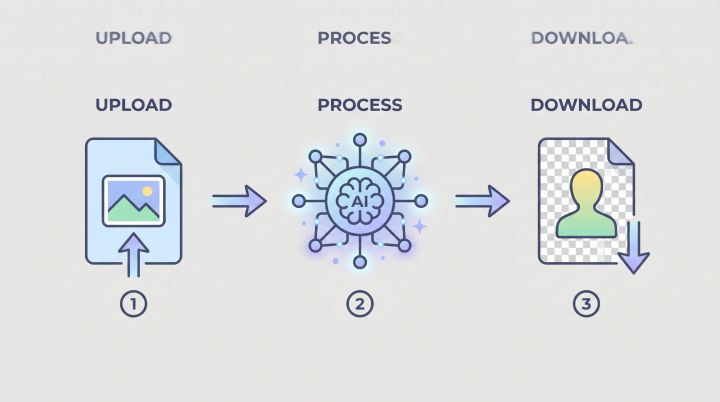
RemoveBgNow takes a more straightforward approach than most tools on this list: upload an image, get a transparent PNG back at its original resolution, with no watermark, no account, and no credit system. According to the tool's own site, uploads support JPG, PNG, WebP, and GIF up to 25 MB, average processing lands around five to eight seconds, and images are automatically deleted after processing rather than stored.
The clearest way to see the difference is to put it directly against remove.bg, the tool most people compare everything else to:
Resolution: remove.bg's free tier caps output at roughly 0.25 megapixels — a preview, not a usable file. RemoveBgNow's free download keeps the image at the resolution you uploaded, so a 4K product photo comes back as a 4K transparent PNG.
Cost to unlock full quality: remove.bg requires spending a credit (paid) to get a full-resolution download. RemoveBgNow's full-resolution download is free with no credit system at all.
Account requirement: remove.bg doesn't require an account for the low-res preview, but full-resolution exports are tied to its paid credit system. RemoveBgNow never requires an account, at any resolution.
Watermark: Neither tool watermarks its output, but that parity matters less once you factor in that only one of them gives you a full-resolution file for free.
That gap is why RemoveBgNow is a genuinely strong pick as the best free remove.bg alternative for anyone who wants a full-quality result without hitting a paywall at the download button. It's not trying to out-build remove.bg's API ecosystem or Photoroom's e-commerce feature set — it's solving the specific problem of "I need one clean, full-resolution cutout, right now, for free."
Beyond the core background remover, the site includes a batch tool for processing multiple images in one pass, a dedicated passport and ID photo maker with white or solid-color background options, and an image upscaler — covering a fair amount of ground for a single free tool without needing to jump between separate apps.
This combination — full resolution, zero watermark, no signup — is genuinely useful for the two groups who feel free-tier limits the most: small e-commerce sellers processing product photos one by one, and students or individuals who need a one-off clean image without setting up an account for a single use.
Which Tool Should You Actually Use?
The right choice depends less on which tool is "best" overall and more on what you're trying to get out of it.
If you're an e-commerce seller who needs full-resolution product cutouts without paying a subscription for occasional use, a tool with no resolution cap and no watermark on the free tier — like RemoveBgNow — solves the immediate problem without adding a monthly cost. If you're already deep in Adobe's tools, Adobe Express is a natural fit since it's already unlimited and watermark-free. If you're building product images at real volume and want batch processing, template automation, and mobile apps built around resale platforms, Photoroom's paid tier earns its price. And if you're doing serious API-driven automation across thousands of images, remove.bg's developer tooling is hard to beat, credit costs included.
Canva only really makes sense here if you're already paying for Canva Pro for its design features and the background remover is a bonus rather than the reason you're subscribing.
Common Mistakes People Make With Background Removers
A few habits quietly ruin results across every tool on this list, not just the weaker ones. Uploading a heavily compressed JPG and expecting a crisp, high-resolution cutout is one of the most common — the AI can only work with the detail that's actually in the file, so a blurry source image produces a blurry edge no matter how good the tool is. Another is skipping a contrast check: subjects that blend closely into their background in color or lighting confuse even strong segmentation models, and a quick edit to brightness or contrast before upload often fixes edge quality more than switching tools does.
It's also worth double-checking commercial usage rights before publishing images from a free tier. Some tools, including Photoroom's free plan, explicitly restrict free-tier exports from commercial use even though the file itself has no visible watermark — a detail that's easy to miss and can matter if you're using the image for a paid listing or ad.
Conclusion
There's no single "best" background remover in 2026 — there's a best fit for what you're doing. If you want the fastest path to a full-resolution, watermark-free transparent PNG without creating an account, RemoveBgNow is the strongest free remove.bg alternative on this list — it solves the exact limitation that sends most people looking for an alternative in the first place: a free tier that actually gives you a usable, full-resolution file. If you need API access, batch automation at true enterprise scale, or you're already paying for a broader design suite, the calculation shifts toward remove.bg, Photoroom, or Canva instead. Match the tool to the actual task, and the fine print — resolution caps, watermarks, signup walls — stops being a surprise at the download button.
Sources & Further Reading
remove.bg Help Center — "What is the difference between the free plan, subscription, and Pay-as-you-go?" (remove.bg): Official documentation confirming the free tier's 0.25-megapixel preview resolution limit and credit-based paid plans.
PhotoRoom pricing guide, eesel AI (2026): Independent breakdown of Photoroom's free-plan watermark and commercial-use restriction, and its Pro/Max/Ultra tier pricing.
PhotoRoom review, ICON (2026): Supporting detail on Photoroom's free-plan export limits and Pro plan pricing.
"How to remove background in Canva," Pixelbin and related 2026 guides: Multiple independent sources confirming Canva's Background Remover is restricted to Canva Pro subscribers.
RemoveBgNow (www.removebgnow.in): Product page used to verify RemoveBgNow's own free-tier specifications, including resolution handling, file size limits, processing time, and no-signup policy.
FAQs
Q. What is the best free alternative to remove.bg? RemoveBgNow is the strongest free option if your main complaint with remove.bg is its resolution cap. remove.bg's free tier limits output to a low-resolution preview and charges credits for full-resolution downloads, while RemoveBgNow gives you the full original resolution for free, with no account and no watermark.
Q. Is there a completely free background remover with no watermark? Yes, but not all "free" tools are equal. Several tools, including RemoveBgNow, offer unlimited background removal with no watermark and no signup. Others, like Photoroom, are free to use but add a watermark unless you upgrade to a paid plan.
Q. Why does my free background remover download look blurry? Most free tiers, including remove.bg's, cap the free download at a low resolution (around 0.25 megapixels for remove.bg) and reserve full-resolution exports for paid credits. Tools that don't apply this cap, like RemoveBgNow, return the image at its original uploaded resolution.
Q. Can I use free background remover results for my online store? It depends on the tool's terms. Some free tiers, including Photoroom's, restrict commercial use even when there's no visible watermark. Always check the specific tool's terms of use before publishing images commercially.
Q. Which background remover handles hair and fur best? remove.bg and Adobe Express are frequently cited for strong performance on fine details like hair strands and fur, thanks to AI models trained heavily on portrait data. Most modern tools handle straightforward subjects well; the differences show up mainly on complex edges.
Q. Do I need to create an account to remove a background online? Not always. remove.bg allows free preview use without an account, and RemoveBgNow doesn't require one at all. Photoroom, Adobe Express, and Canva all require an account to use their background removers.
Q. What's the difference between a background remover and a full photo editor like Canva? A dedicated background remover does one job — isolating a subject from its background — quickly and without extra steps. A full editor like Canva bundles that function into a larger design workspace, which is useful if you're already building graphics there but adds friction if background removal is all you need.
Discover how AI background removers identify objects, detect edges, handle hair and transparency, and separate subjects from complex backgrounds. Learn the science behind image segmentation and matting in simple terms.