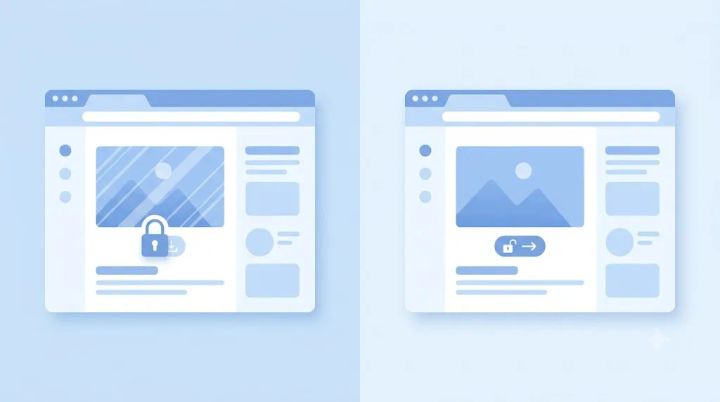
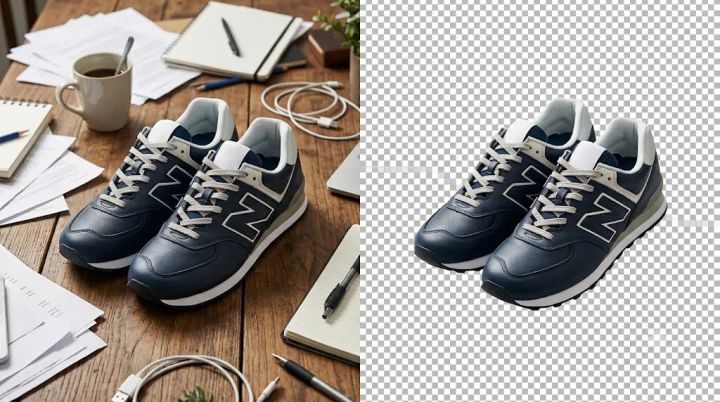
If you've searched for a background remover, you've probably run into the same pattern: the tool looks free until you try to download your image, and then you hit a paywall, a watermark, or a resolution downgrade. So it's a fair question to ask before uploading anything — is RemoveBgNow actually free, or is there a catch somewhere?
Short version: based on RemoveBgNow's own published terms, the core background removal tool is free to use, with no signup and no watermark on the output. This article breaks down exactly what "free" covers, what the practical limits are, and where an automated tool like this still has rough edges.
The Direct Answer
According to RemoveBgNow, the background remover, batch background remover, passport photo maker, and image upscaler are all usable without creating an account or paying. There's no watermark added to downloaded images, and downloads aren't capped at a lower resolution than what you uploaded — a common trick some "free" tools use to push you toward a paid tier.
That said, "free" doesn't automatically mean "no limits at all." A few practical boundaries are worth knowing before you rely on it for serious work, which is what the rest of this article covers.
Why This Question Matters in the First Place
Background removal has become a fairly crowded product category, and a lot of tools use a similar tactic: let you preview the result for free, then require payment to actually download it in usable quality. Others allow a free download but stamp a visible watermark across the image, or cap you to a small number of free uses per day before switching to credits.
This isn't a criticism of the category — running AI image processing at scale costs money, so some form of monetization is normal. The point is just that "free" can mean very different things depending on the tool, so it's worth checking what a specific product actually includes rather than assuming.
What's Actually Included in RemoveBgNow's Free Plan
Based on the details published on removebgnow.in, here's what's covered without payment:
No account or signup required — you can upload and download without creating a login.
No watermark on the resulting image.
Full-resolution downloads — the output keeps your original image dimensions rather than being downscaled, up to a stated maximum of roughly 16 megapixels (around 4096×4096 pixels).
No stated daily limit or credit system for the core background remover.
File uploads up to 25 MB, in JPG, PNG, WebP, or GIF format.
Background options beyond plain transparency, including a set of preset colors and a custom color picker.
Automatic deletion of uploaded images after processing, per the site's stated privacy approach — worth reading the actual Privacy Policy if data handling matters for your use case.
Processing itself is quick in most cases — the site cites an average of a few seconds per image — though actual speed will vary with image size and your connection.
It's worth being upfront here: these are the terms RemoveBgNow currently publishes. Free-tool policies on any platform can change over time, so if you're building a workflow that depends on this staying free indefinitely, it's sensible to check the current Terms of Use before relying on it long-term.
The Other Free Tools Bundled In
RemoveBgNow isn't just a single background remover — a few related tools are included under the same free model:
Batch background remover. Instead of uploading one image at a time, you can process multiple product photos at once and download the results as a single archive. This matters most for people managing catalog photos rather than one-off edits.
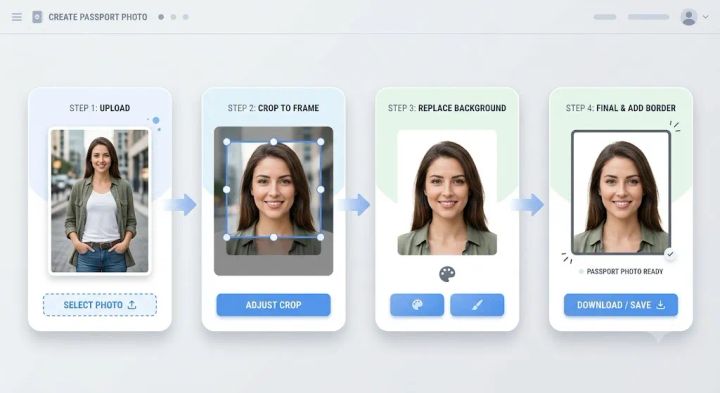
Passport photo maker. This walks through a fixed sequence: upload a photo, crop it if needed, remove the background, pick a background color that matches the required standard (white or off-white for most passport and visa formats), optionally add a border stroke, then download. It's built around common biometric photo requirements for several countries, though you should always double-check the exact size and background rules for your specific country and document type before submitting — those specifications come from government authorities, not from any photo tool.
AI image upscaler. This enlarges lower-resolution images using a super-resolution model, aimed at fixing pixelation or preparing images for print. It's a separate function from background removal, but it's included in the same free toolset.
Where Automated Background Removal Still Struggles
This is the part a lot of "is it free" articles skip, but it matters more than pricing for whether the tool is actually useful to you.
No AI background remover — RemoveBgNow included — gets every image perfect on the first try. Certain situations are genuinely hard for this kind of model:
Fine hair and fur around the edges of a subject, where the boundary between subject and background is soft rather than sharp.
Transparent or semi-transparent objects, like glassware, sheer fabric, or plastic wrap, where there's no single clean edge to cut along.
Low contrast between subject and background, such as a person in a white shirt photographed against a white wall.
Cluttered or busy scenes with multiple overlapping objects, where it's ambiguous what counts as "foreground."
In these cases, the output may need a manual touch-up in an image editor, particularly for commercial work where imperfect edges are noticeable — think product photography that will sit on a store listing next to competitors' clean cutouts. RemoveBgNow documentation describes techniques aimed at handling some of these cases (like preserving partial transparency for glass or fine detail around hair), but "handles it better" isn't the same as "handles it perfectly," and no vendor's marketing claims should be taken as a guarantee for your specific images.
Photos taken with even lighting, a reasonably distinct subject, and some breathing room around the edges of the frame tend to produce cleaner results with any automated tool, not just this one.
Who Gets the Most Value From a Free Tool Like This
A no-cost, no-signup background remover tends to be most useful for:
Online sellers who need to process a batch of product photos for a marketplace listing without paying per image.
Students, job seekers, and travelers who need a quick, correctly formatted passport or ID photo without visiting a photo studio.
Designers and content creators who need occasional transparent PNG cutouts and don't want to open a full image editor for a simple task.
Casual users editing a handful of personal photos, where perfect precision on every edge isn't critical.
When You Might Want a Different Tool Instead
A free browser-based tool isn't the right fit for every situation. You might be better served by something else if you need:
Pixel-perfect results on very difficult images (fine jewelry with reflective surfaces, complex hair against similarly colored backgrounds) where manual masking in a tool like Photoshop may still outperform automated segmentation.
Guaranteed enterprise-level uptime or support SLAs for business-critical workflows.
For most everyday and small-business use cases, though, the free tier covers the actual task — removing a background and getting a usable, full-resolution file back.
Upload your image by dragging it in or selecting it from your device (JPG, PNG, WebP, or GIF, up to 25 MB).
Wait a few seconds while the AI processes the image and separates the subject from the background.
Choose your output: keep it transparent, pick a preset color, or set a custom background color.
Download the result as a PNG.
Frequently Asked Questions
Q. Does RemoveBgNow charge for high-resolution downloads? No — based on the site's current terms, downloads keep the original resolution up to the stated maximum, without an extra charge for full-size output.
Q. Is there a limit on how many images I can process per day? RemoveBgNow states there's no daily cap or credit system for the core tool. As with any published policy, it's worth checking the current terms if you're planning very high-volume use.
Q. Does the free version add a watermark? No, according to the site's stated terms, downloaded images do not include a watermark.
Q. Do I need to create an account to use it? No. Uploading and downloading doesn't require signup or an email address, based on the site's current setup.
Q. Will background removal reduce my image quality? The background itself is removed, but the subject's original resolution is preserved rather than compressed, per the site's stated specs. Very complex edges (like flyaway hair) may still show minor artifacts depending on the source photo.
Q. Can I use this for product photos on Amazon or Shopify? Yes, that's a common use case — you can remove the background and replace it with a plain white background to match typical marketplace listing requirements. Always confirm the exact background and framing rules for the specific marketplace before publishing.
Q. What happens to the photos I upload? RemoveBgNow states that uploaded images are automatically deleted after processing and are not stored or reused. For the full policy, see the site's Privacy Policy.
Q. Can I remove backgrounds from photos on my phone? Yes — the tool runs in a mobile browser, so you don't need to install an app to use it from a phone or tablet.
Final Takeaway
Based on what RemoveBgNow currently publishes, the core background remover, batch tool, passport photo maker, and image upscaler are all usable without payment, signup, or a watermark on the output — which puts it ahead of the more common "free preview, paid download" pattern used elsewhere in this category. The realistic caveat isn't about cost; it's about what any automated background remover can and can't do well. Simple, well-lit subjects tend to come out clean. Fine hair, transparent materials, and low-contrast scenes may need a manual pass afterward, especially for commercial use. If your use case is everyday photo editing, product listings, or a passport photo, it's a reasonable first tool to try before reaching for paid software.
Sources Verifed
RemoveBgNow homepage and FAQ (removebgnow.in): Source for the free-plan claims used throughout this article — no signup, no watermark, full-resolution downloads, 25 MB upload limit, supported formats, auto-deletion of uploads, and average processing time. These are the company's own published claims as of this writing; recommend a final check against the live site immediately before publishing, since free-tier terms can change.
RemoveBgNow Privacy Policy and Terms of Use: Should be checked directly for the exact current wording on data retention and service terms rather than relying solely on homepage summaries.
02
background removal
Is Remove.bg Completely Free? Here's What You Actually Get
Remove.bg is not completely free. You can remove a background and preview the result at no cost, but downloading a full-resolution, watermark-free image usually requires credits or a subscription. In this article, we will walk through exactly what remove.bg gives you for free, what it charges for, how its pricing works in 2026, and what your options are if you want a background removed without paying anything